⚠
Unusable image
With the wrong Input Color Space, your log image appears flat, washed out and lacking contrast. Invisible in the pipeline without prior manual correction.
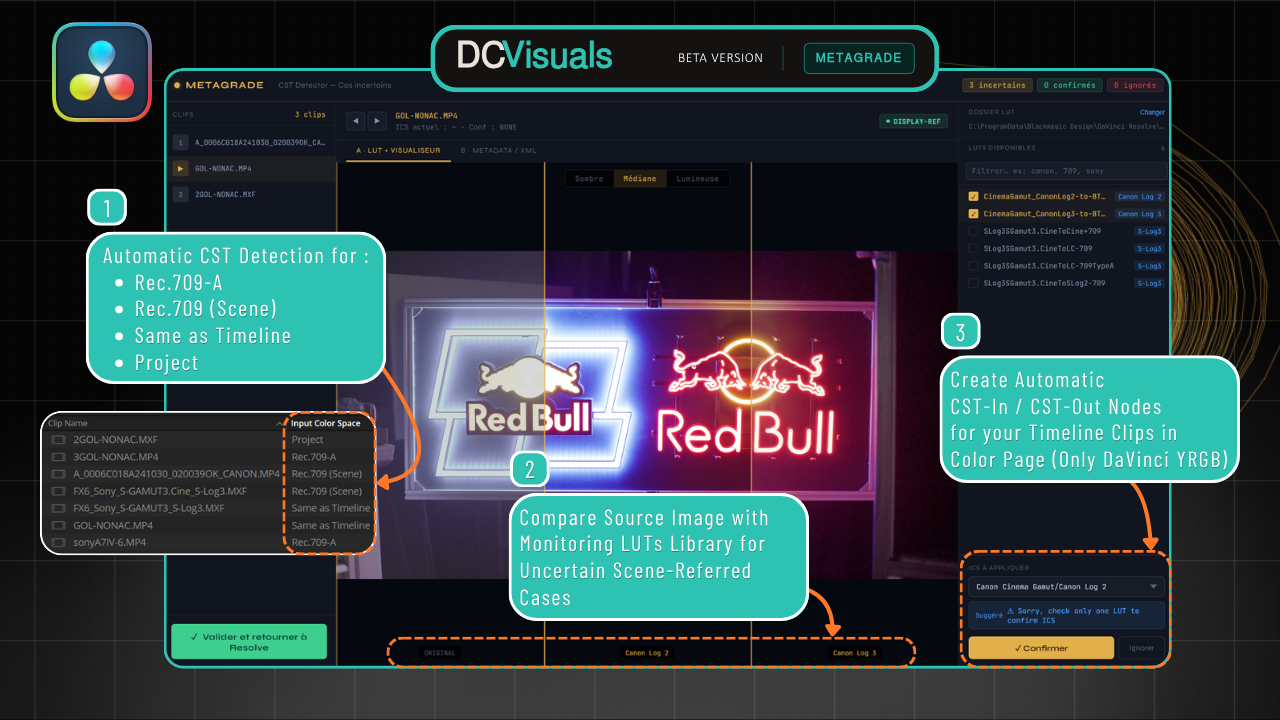
DaVinci Resolve does not always recognise the real Color Space of your clips. MetaGrade detects it automatically, validates uncertain cases visually, then prepares your CST workflow.
This is not a DaVinci Resolve bug. Manufacturers such as Canon, Sony, DJI, GoPro, Apple, Panasonic, Fujifilm and Nikon do not always write or expose the Color Space and Gamma in their file metadata. Resolve then applies an incorrect default value.
With the wrong Input Color Space, your log image appears flat, washed out and lacking contrast. Invisible in the pipeline without prior manual correction.
In DaVinci YRGB Color Managed mode, you have to correct the ICS in each clip’s attributes. In YRGB mode with CST nodes, you manually set every CST-In node.
Manufacturers may encode this information in proprietary binary data, omit it entirely, or write it with names different from those expected by Resolve.
MetaGrade integrates directly into DaVinci Resolve Studio through the official Python API. No modification of your source files.
MetaGrade analyses all clips in your timeline or Media Pool. It identifies clips incorrectly recognised by Resolve — Rec.709-A, Rec.709 (Scene), Same as Timeline, Project — and cross-checks all available metadata to determine the real Color Space and Gamma.
For clips where metadata is insufficient or missing (transcode, proxy, export without tags), MetaGrade opens a side-by-side viewer. You compare the source image with several monitoring LUTs to confirm the correct Input Color Space before any writing.
Once confirmed, MetaGrade automatically creates CST-In and CST-Out nodes for all your clips directly in the Color page. DaVinci YRGB mode only.
Demonstration on real Canon clips and Canon and Sony LUTs. Detection, LUT Viewer and Input Color Space confirmation.
MetaGrade exposes the real metadata available in your files and gives you full visual control before any CST decision.
Manufacturers do not systematically write Color Space information into their files. Resolve applies a default value. This is not a bug — it is missing information at the source.
No. MetaGrade uses the official Python API of DaVinci Resolve, available only in the Studio version.
Not publicly. This page is proof of work and an entry point for future beta testers. The notification form is already available now.
No. MetaGrade writes only into clip attributes inside the Resolve project. Your source files remain untouched.
Yes. Step 1 (ICS detection and writing) works for both modes. Step 3 (automatic CST node creation) is specific to DaVinci YRGB mode.
Windows and macOS, with DaVinci Resolve Studio 18 minimum. Tested on Resolve 20 — Resolve 21 compatibility is currently being checked post-NAB 2026.
MetaGrade is only as precise as the cases it has been tested on. If you have clips that DaVinci Resolve does not recognise correctly, your contribution can make a real difference.
Send your files via WeTransfer or SwissTransfer to:
contact@dcvisuals.fr
Your files are used to improve MetaGrade detection.
Public demonstrations are planned and you give explicit agreement when submitting.
MetaGrade is in active development. This page is proof of work and an entry point for the first beta testers. Planned distribution through Gumroad — pricing to be confirmed.